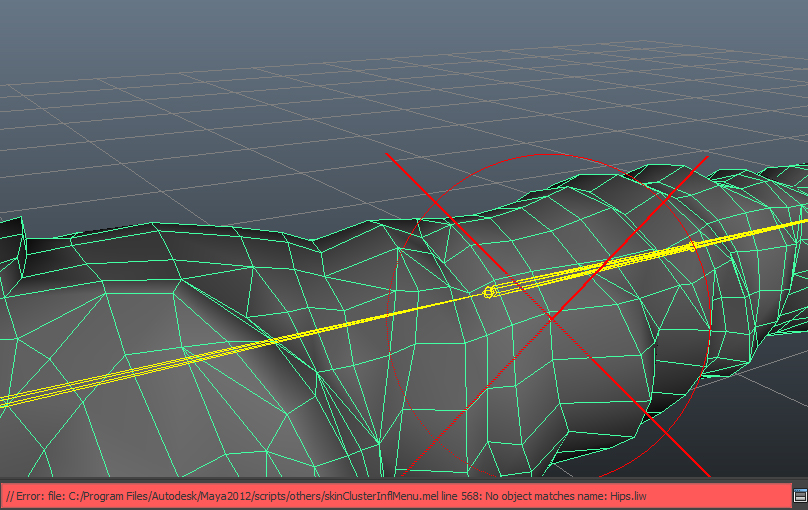
The problem:
When painting skinweights in maya you sometimes get a big red X and you cant select influences nor paint them. Additionally you get an error that looks something like this
// Error: file: C:/Program Files/Autodesk/Maya2012/scripts/others/skinClusterInflMenu.mel line 568: No object matches name: Hips.liw //
Why is this happening?
Maya has an internal attribute called "liw" that indicates if influences are locked or not. When exporting the mesh it is exporting this attribute as a custom attribute but on import it doesnt recognize it as its own and trys to create it again. But because the name is already taken it will just give you an error.
How can I fix it?
Make sure that all skinclusters are deleted and execute this script. It is deleting this attribute so that maya can recreate it when you create the skincluster again.
import pymel.core as pm

def fnLockInfluenceWeightsFix(aNodes):
    status = False
    for node in aNodes:
        if pm.attributeQuery('lockInfluenceWeights',n=node,exists=True)==True:
            pm.deleteAttr('%s.lockInfluenceWeights'%node)
            status = True

    if status == True:
        print('LockInfluenceBug fixed. Maya restart needed!')
    return status

print fnLockInfluenceWeightsFix(pm.ls(ap=True,dag=True,type=pm.nodetypes.Joint))
If everything works you should get a warning that you have to restart maya. Save the scene and restart it. This should make it work again.
D'oh
Edit:
To prevent this issue from happening again, please make soure you have the latest FBX plugins.
Thanks Brad Clark
COMMENTS
LEAVE A COMMENT